 spokt
spoktReader guide
Yes — There's an App That Highlights Words as It Reads Aloud
Yes — apps that highlight words as they read aloud exist, and one is already built into your iPhone for free. The real differences are in sync quality (word-by-word vs. whole sentences) and which formats they handle — PDFs are where most tools break down. Here's an honest comparison of the built-in options, Speechify, and Spokt.
Free apps that highlight words as they read aloud (you may already have one)
Before you pay for anything, check what's already on your devices. Every major platform ships a free tool that highlights text as it reads — with real limitations, but genuinely useful for short sessions.
On iPhone and iPad, the feature is called Spoken Content. To set it up:
- Open Settings > Accessibility > Spoken Content.
- Turn on Speak Screen (and Speak Selection if you want a Speak button whenever you select text).
- Tap Highlight Content, switch it on, and choose whether to highlight Words, Sentences, or both — you can pick the highlight colors, too.
- Swipe down from the top of the screen with two fingers, or ask Siri to "Speak Screen." Your iPhone reads whatever is visible and highlights each word as it's spoken.
Apple documents the feature on its Spoken Content support page. The catches: the default voice sounds robotic unless you download an enhanced version (under Spoken Content > Voices), it doesn't remember your place between sessions, and it gets unreliable on long or scanned PDFs — it can skip sections or report nothing to speak.
On Windows and the web, Microsoft's Read Aloud in Edge and Word highlights each word as it reads, and the surrounding Immersive Reader adds line focus, wider spacing, and syllable splitting — thoughtfully designed for dyslexic readers, and free. On Chromebooks, Select-to-Speak highlights words as it speaks any text you select.
All three are fine for a web article at your desk. Where they fall short is sustained reading: none gives you a library, remembers your position in a long document, or handles PDFs gracefully. That's the gap dedicated apps fill.
Word-by-word vs. sentence highlighting: the detail to check first
Not every app that advertises "highlighting" does the same thing, and the difference matters more than voice counts. True word-by-word sync lights up each word at the exact moment it's spoken, so your eyes never scan or guess — the app does the tracking for you. That's what a text to speech app that highlights words as it reads should actually mean.
Sentence-level highlighting — what TTSReader and several web readers offer — paints the whole sentence and leaves you to follow along within it yourself. It tells you roughly where you are, but it doesn't solve the core problem: keeping your place word by word, especially at faster playback speeds or in dense text.
Before paying for anything, check three things:
- Granularity: does it highlight individual words, or just sentences and paragraphs?
- Sync accuracy: does the highlight stay locked to the voice at 1.5x and 2x, or drift ahead and behind?
- Format coverage: does highlighting work on what you actually read? Web articles are easy — PDFs are where most tools quietly give up.
How the main options compare: formats, sync, and cost
Here's the honest picture across the tools people actually consider:
| Tool | Highlighting | Works on | Price |
|---|---|---|---|
| iOS Spoken Content | Words and/or sentences (configurable) | Anything on screen; shaky on long or scanned PDFs | Free, built in |
| Microsoft Read Aloud / Immersive Reader | Word-by-word | Web pages in Edge, Word documents | Free |
| Chromebook Select-to-Speak | Word-by-word | Selected on-screen text (ChromeOS) | Free |
| TTSReader | Sentence only | Pasted text, web | Free tier, paid upgrade |
| Speechify | Word-by-word | PDFs, articles, docs | Free tier (~10 voices, 1.5x cap); Premium $139/yr |
| Spokt | Word-by-word, karaoke-style | PDFs, EPUBs, web articles, plain text — plus your own MP3/M4B audiobooks with companion text | Free tier; optional Plus or one-time lifetime unlock |
Two notes on cost, since it's the loudest complaint in this category. Speechify's free plan does include highlighting, but it works more like a demo: roughly 10 standard voices and a 1.5x speed cap, with the natural voices behind Premium at $139 per year (or $29 month-to-month). Spokt is structured differently: a real free tier with monthly premium voice time included, an optional Plus subscription, and a one-time lifetime unlock if you'd rather never subscribe at all — see the full cost comparison. With a paid plan, top up premium voice time and sync minutes anytime with voice packs.
One caveat that applies everywhere: text to speech needs actual text. A scanned, image-only PDF won't read aloud in any of these tools until it's been converted to real text first.
Why reading and listening at the same time works (dyslexia, ADHD, focus)
Reading and listening at the same time — researchers call it bimodal presentation — is one of the better-studied assistive reading strategies. A 2023 study of children with reading and language difficulties found that text to speech significantly improved reading comprehension compared with silent reading, and that students with dyslexia benefited the most (study on PubMed).
Interestingly, that same study found the highlighting itself didn't add a measurable comprehension boost on top of the audio. So why does it matter so much in practice? Because highlighting solves a different problem: attention and place-keeping. If you have ADHD, or you're listening at 1.5x, or a notification pulls your eyes away for two seconds, synced highlighting means you re-anchor instantly instead of hunting for the sentence the voice is on. It's what makes a long read and listen session actually sustainable — and it's why people who try word-level sync rarely go back to audio alone.
If tracking is your struggle, look at the customization each tool offers: iOS lets you choose highlight colors and whether words, sentences, or both get marked; Immersive Reader adds line focus and extra spacing. The goal is the same everywhere — keep your eyes and your ears on the same word at the same time.
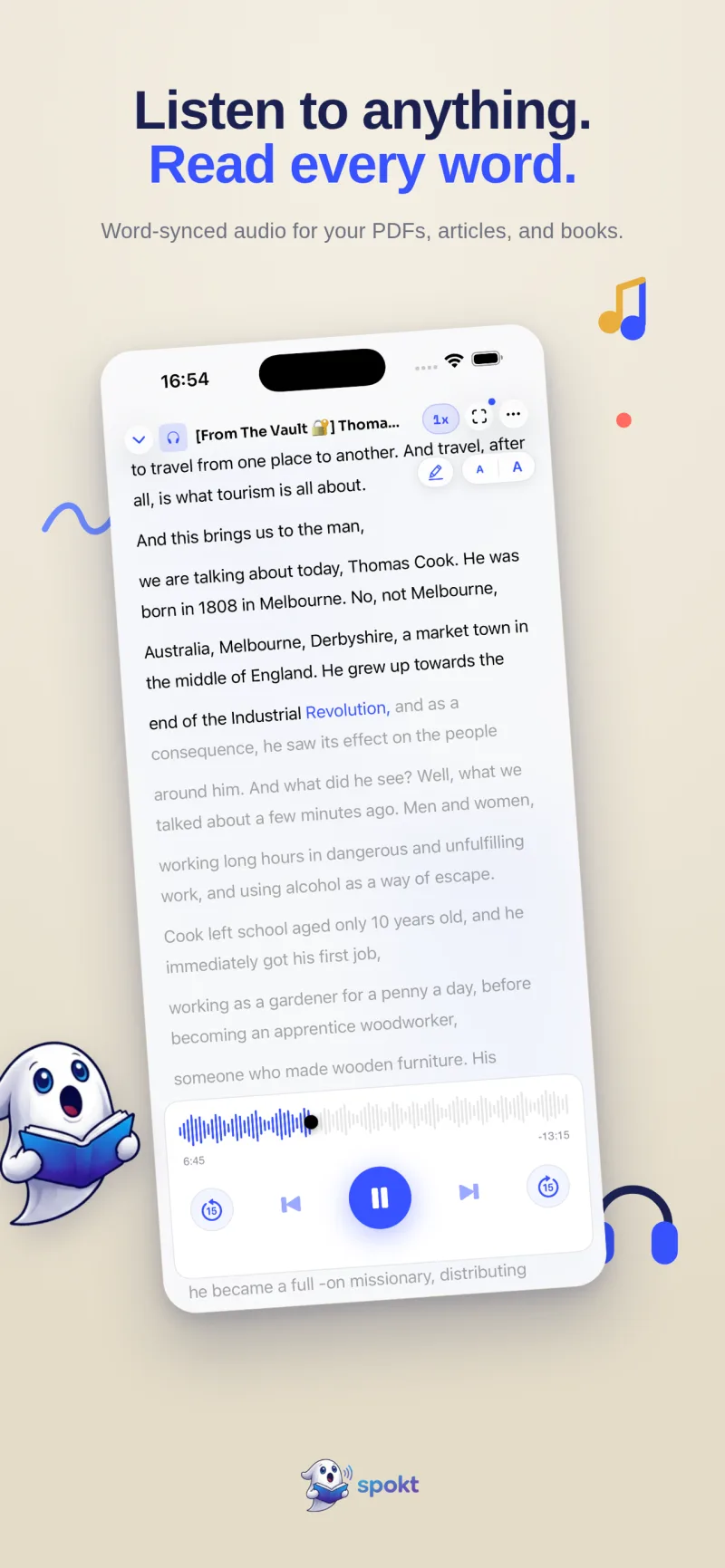
How Spokt highlights every word as it reads to you
If you read PDFs, EPUBs, articles, or whole books and want every word lit up in perfect sync — with a natural voice and a library that remembers your place — here's the whole flow in Spokt for iPhone and iPad:
- Download Spokt free from the App StoreThere's a real free tier with monthly premium voice time included — no subscription required to start. With a paid plan, top up premium voice time and sync minutes anytime with voice packs.
- Add what you want to readImport a PDF or EPUB, paste a web link, or drop in plain text. Everything lands in a library with folders and search.
- Pick a natural AI voiceChoose a premium voice (or a Studio broadcast-quality one) and the audio generates in the background while you do something else.
- Press play and follow the karaoke highlightingEach word lights up at the exact moment it's spoken — on everything in your library, PDFs included.
- Tune the pace to how you readAdjust speed from 0.75x up to 2x, or loop a single sentence in the immersive teleprompter mode until it clicks.
- Come back anytimeYour library remembers your exact spot, shows progress on covers, and syncs across your devices.
Frequently asked questions
Is there an app that highlights words as it reads to you?
Yes. On iPhone, the built-in Spoken Content feature can highlight words or sentences as Speak Screen reads, and dedicated apps like Speechify and Spokt do true word-by-word highlighting on PDFs, articles, and more. Spokt is free to download with a real free tier — see the full feature rundown on the Spokt homepage.
Does highlighting words while reading aloud help with dyslexia or ADHD?
Research on children with reading difficulties shows that hearing text while seeing it significantly improves comprehension compared with silent reading, with dyslexic students benefiting most. The highlighting itself mainly solves the tracking problem — your eyes always know exactly where the voice is — which is what makes read-along sustainable for anyone who loses their place or drifts when reading silently.
Is there a read and listen at the same time app for audiobooks I already own?
Yes — Spokt imports your own MP3, M4B, M4A, and WAV audiobooks (share them straight from the Files app; multiple files become one book's chapters) and pairs them with a companion PDF or EPUB, so you get a word-synced transcript of the real human narration. See the full walkthrough in our guide to reading along with your own audiobooks.
Is Speechify's word highlighting free?
Partly. Speechify's free plan includes word highlighting but limits you to around 10 standard voices and caps playback at 1.5x speed; the natural premium voices require Premium at $139 per year (or $29 month-to-month). If that's more than you want to spend, see our comparison of free Speechify alternatives, including pay-once options.