 spokt
spoktReader guide
Voice Dream Reader Alternatives: What to Use in 2026
Voice Dream Reader isn't dead, but after its 2023 sale and 2024 subscription switch, many longtime users want a Voice Dream Reader alternative they can actually trust. If you bought the app outright you keep your features, so there's no emergency — but if you're switching, a few apps now cover the library, synced word highlighting, and file support Voice Dream was loved for, some without a subscription. Here's the accurate timeline, an honest comparison, and how to move your library out.
What Actually Happened to Voice Dream Reader?
If you searched "voice dream reader discontinued," here's the accurate version — because the story is widely misreported, including by articles ranking at the top of Google. Voice Dream Reader is not dead. But the app that adults with dyslexia, low-vision readers, and students trusted for a decade went through a genuinely rough stretch, and it changed who the app is for.
- 2023: Winston Chen, the original developer, sold Voice Dream to Applause Group after running it as a beloved one-time-purchase app for over a decade.
- Late March 2024: Applause announced that from May 1, 2024, every user — including people who had already paid for the app and its voices — would need a subscription of $79 per year (discounted to about $59 at launch) to keep their features.
- April 2024: The backlash was immediate. Accessibility advocate Jonathan Mosen argued the plan breached Apple's App Store guidelines because it stripped features people had already paid for, and communities like AppleVis organized in protest.
- Days later: Applause backed down for existing customers: one-time purchasers keep every feature they paid for at no extra cost. New features, however, may ship subscription-only.
- Today, in 2026: the app is still on the App Store and still receiving updates — but new users pay roughly $79.99 per year on iOS. The famous pay-once reading app no longer exists for newcomers.
So the real question isn't "what replaced a dead app." It's two questions: should existing purchasers stay, and what should new users — or anyone burned by the episode — pick instead?
Should You Stay — or Do You Even Need a Paid App?
If you're an existing one-time purchaser: your paid features survived the reversal, and the app hasn't been abandoned — updates have continued since the controversy. There's no urgent technical reason to leave. The reasons people switch anyway are about trust: the pricing model changed once without warning, new capabilities are likely to land behind the subscription, and nobody wants to rebuild a reading workflow under duress a second time. Migrating calmly now beats migrating in a panic later.
If you're a new user, the calculus is simpler: Voice Dream now costs about $79.99 a year, so it competes on price with every other subscription reader instead of undercutting them.
Before paying anyone, try the free options — for some people they're genuinely enough:
- iOS Spoken Content. Go to Settings, then Accessibility, then Spoken Content, and turn on Speak Screen and Highlight Content. A two-finger swipe down from the top of the screen reads whatever's visible, with word and sentence highlighting. The limits: robotic default voices, no library, it loses your place, and it's clumsy on long PDFs — our iPhone PDF read-aloud guide covers the full setup and its failure modes.
- Safari's Listen to Page. Recent iOS versions can read web articles aloud from Safari Reader — fine for one-off reading, but there's no highlighting and no library.
- Bookshare's reading tools. If you're a student or have a qualifying print disability, Bookshare membership includes its own reader apps for its DAISY library. That ecosystem doesn't need a commercial replacement.
Where the free options fall short is exactly where Voice Dream shone: a persistent library that remembers your position, natural voices, and reliable word-by-word highlighting on your own files. That's what the paid alternatives compete on.
Voice Dream Reader Alternatives, Feature by Feature
Voice Dream users don't shop on gimmicks; they shop on a checklist: does it keep a library with folders, does it highlight each word in sync, which files does it read, and — after 2024, above all — what's the pricing model. Almost any app that reads text aloud can handle a web article; this checklist is what separates a tool you live in from a novelty.
| App | Word highlighting | Library & folders | Reads | Pricing model |
|---|---|---|---|---|
| Voice Dream Reader (staying put) | Word + sentence | Folders, sync | PDF, EPUB, DAISY, Bookshare, web | ~$79.99/yr for new users; grandfathered features if you paid once |
| Spokt | Word-by-word karaoke sync, across the whole library | Folders, search, progress on covers, cross-device sync | PDF, EPUB, web articles, plain text; imports your own MP3/M4B audiobooks | Real free tier; optional Plus or one-time lifetime unlock |
| Speechify | Word highlighting | Library | PDF, web pages, docs | ~$139/yr; free tier limited to a handful of basic voices and capped speed |
| NaturalReader | Highlighting | Basic library | PDF, web, docs | Subscription plans |
| iOS Spoken Content | Word + sentence (Highlight Content) | None — reads the screen | Whatever's on screen | Free, built in |
| Bookshare reader apps | Varies | Bookshare bookshelf | DAISY/Bookshare titles | Free with Bookshare membership |
One honest caveat: Spokt has no DAISY or Bookshare integration, so if your library is mostly Bookshare titles, stay in that ecosystem. What Spokt covers unusually well is the rest of the Voice Dream workflow: PDFs, EPUBs, articles, and plain text read in natural AI voices with per-word highlighting, folders with visible progress, adjustable speed from 0.75× to 2×, and sync across devices. If you're specifically hunting for a text to speech app for dyslexia as an adult, weight word-level highlighting above everything else — following each word as you hear it is the feature that makes long documents readable, and it's the one built-in tools do worst on PDFs. Spokt also does something Voice Dream never did: import your own MP3 and M4B audiobooks and read along with a word-synced transcript.
On pricing, Spokt is the structural odd one out. Speechify runs about $139 a year; Voice Dream is now about $79.99 a year for newcomers; NaturalReader is subscription-based too. Spokt is free to download with a real free tier — monthly sync minutes and premium voice time included — and offers a one-time lifetime unlock instead of requiring a subscription. For an audience that just lived through a subscription bait-and-switch, pay-once isn't a nice-to-have; it's the filter. With a paid plan, top up premium voice time and sync minutes anytime with voice packs.
How to Get Your Library Out of Voice Dream Reader
The top-ranking articles on this topic skip migration entirely, so here's the practical part. Voice Dream stores your documents locally, and there are two ways out:
- Export individual documents. Open a document in Voice Dream and use its Export/Share option to send the file to the Files app, Dropbox, Google Drive, or another app. Do this for anything that exists only inside Voice Dream.
- Bulk-copy the whole library from a computer. Connect your iPhone or iPad to a Mac (Finder) or PC (iTunes), open File Sharing for Voice Dream Reader, and save the "Voice Dream Library" folder. This grabs everything in one pass.
- Plan around original files, not annotations. Highlights, bookmarks, and reading positions rarely transfer between reading apps in any usable form. Voice Dream can export notes, but treat your source PDFs, EPUBs, and text files as the real migration payload — expect positions to start fresh in the new app.
- Re-import in batches. Bring your files into the new app a folder at a time and rebuild your organization as you go, rather than dumping hundreds of documents into one flat list.
If your exported library is mostly PDFs, EPUBs, articles, and text — the most common case — here's what the rebuild looks like in Spokt.
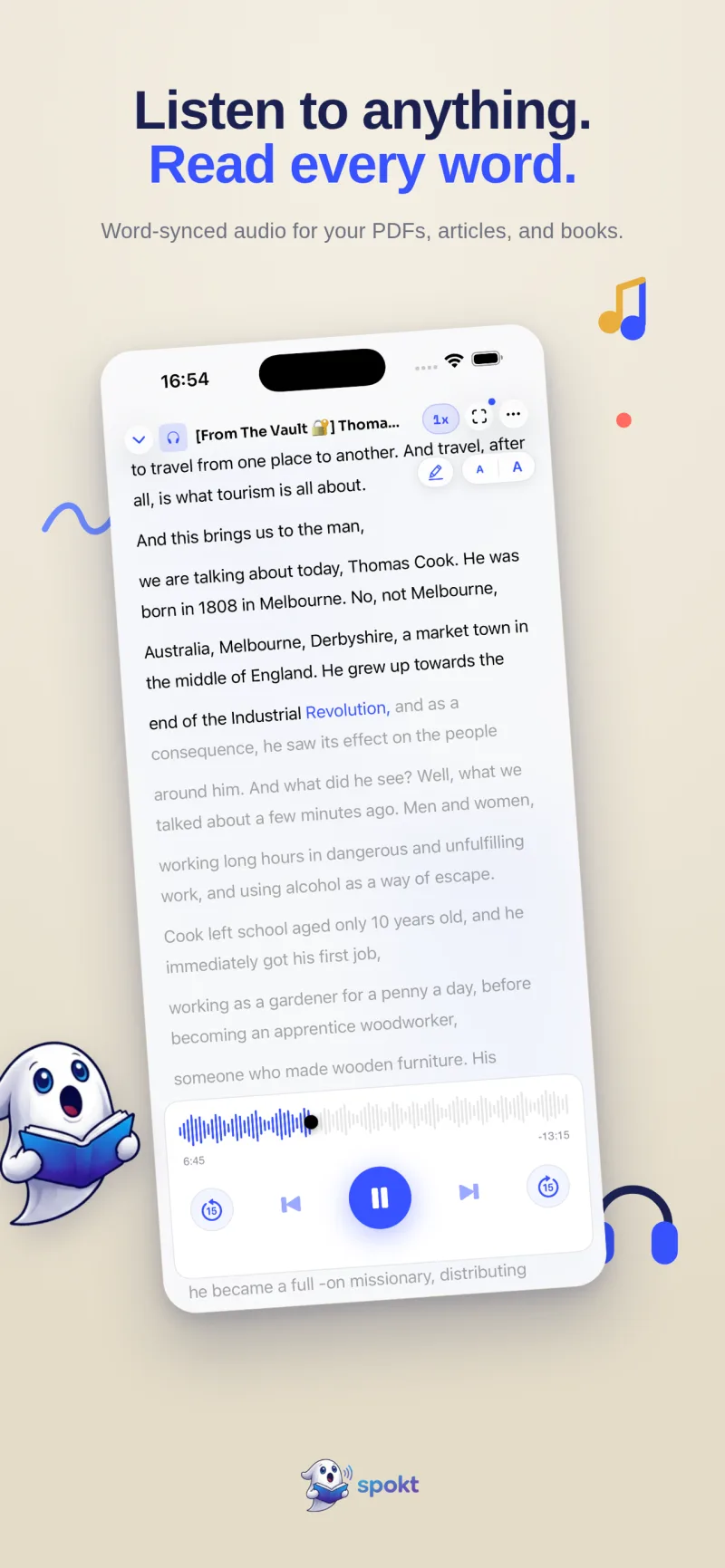
Rebuilding Your Voice Dream Workflow in Spokt
If what you valued in Voice Dream was natural voices, synced highlighting, a real library, and pay-once pricing, the switch takes an afternoon.
- Download Spokt freeGet Spokt from the App Store on your iPhone or iPad. The free tier includes monthly sync minutes and premium voice time, so you can test your real documents before paying anything. With a paid plan, top up premium voice time and sync minutes anytime with voice packs.
- Import your exported filesBring in the PDFs, EPUBs, articles, and plain text you pulled out of Voice Dream. Audio generates in the background with natural premium AI voices — or pick a Studio voice for broadcast-quality narration.
- Read along with word-by-word highlightingPress play and each word lights up perfectly in sync with the audio — the same follow-along support dyslexic and low-vision readers relied on in Voice Dream, working across everything in your library.
- Rebuild your foldersOrganize documents into folders, watch progress appear on covers, and search your library. Your position and library sync across your devices, so you never lose your place.
- Set your paceAdjust playback from 0.75× up to 2×, or loop a single sentence in the immersive teleprompter mode when a passage needs a second pass.
- Pay once if you want moreWhen you outgrow the free tier, choose the one-time lifetime unlock — no subscription required, which is exactly the point after the Voice Dream episode.
Frequently asked questions
Is Voice Dream Reader discontinued?
No. As of 2026 it's still on the App Store and still receiving updates. What changed is the business model: new users pay a yearly subscription (about $79.99 per year on iOS), while people who bought the app outright kept the features they paid for after the April 2024 reversal. Articles claiming the app is discontinued are simply wrong — but the pay-once app newcomers remember is gone.
What's the best text to speech app for adults with dyslexia?
Prioritize true word-by-word highlighting synced to natural-sounding audio, adjustable speed, and a library that remembers your place — those are the features that make long documents readable. iOS Spoken Content's Highlight Content is a free starting point, and dedicated apps like Spokt add natural AI voices and per-word karaoke sync on PDFs and articles; see our full comparison of apps that highlight words as they read aloud.
Is there a free app that reads text aloud on iPhone?
Yes, two kinds. iOS Spoken Content (Speak Screen) is built into every iPhone and free, though the voices are robotic and it loses your place — our step-by-step setup guide covers it. Spokt is also free to download with a real free tier that includes monthly sync minutes and premium voice time, so you can read PDFs and articles with natural voices before deciding whether to pay. With a paid plan, top up premium voice time and sync minutes anytime with voice packs.
Can I replace Voice Dream Reader without another subscription?
Yes — that's the rarest and most important filter after 2024. Most big-name readers are subscription-only now: Speechify runs about $139 per year and Voice Dream itself about $79.99 per year for new users. Spokt offers a one-time lifetime unlock on top of its free tier, so you pay once and own it; our subscription-free alternatives guide goes deeper on the cost comparison.
Does Spokt read EPUBs and DAISY files like Voice Dream did?
EPUBs, yes; DAISY, no. Spokt reads PDFs, EPUBs, web articles, and plain text aloud with word-by-word highlighting, and EPUB also works as the companion text for audiobooks you import as MP3, M4B, M4A, or WAV files, shared straight from the Files app. What it lacks is DAISY or Bookshare integration, so if most of your library is Bookshare DAISY titles, staying on Voice Dream or using Bookshare's own reader apps is the honest recommendation.