 spokt
spoktLearner guide
LingQ Alternatives for Input-Based Learners
If LingQ's price and cluttered interface have you shopping around, you have genuinely good options. Readlang, Beelinguapp, and Spokt each keep the core input-learning loop — import real content, tap words to translate, track what you know — at very different prices. Here's an honest LingQ alternative comparison, including what each free tier really allows and which apps actually feel good on an iPhone.
Why people actually leave LingQ
LingQ gets the method right, and it's worth saying so up front. Co-founded by polyglot Steve Kaufmann, it's built on the same idea as every guide on this site: you acquire a language by reading and listening to large amounts of content you actually want to consume. The library is huge, it supports around 50 languages, and you can import nearly anything — web articles, ebooks, YouTube transcripts.
So why do so many learners search for a way out? Three complaints dominate the forum threads and reviews:
- The price. Premium costs $14.99 a month, or about $120 billed annually, and Premium Plus roughly doubles that. (Current plans are listed on LingQ's pricing page.) That's a serious line item for one tool in your routine.
- The free plan is a demo, not a tier. You can save 20 words — total, ever, not per month — and deleting LingQs doesn't reset the counter. Most people hit that wall in their first reading session.
- The interface. Color-coded word statuses, coins, streaks, playlists, and stats crowd every screen. Reviewers have called it cluttered and dated for years, and beginners in particular describe being dropped into authentic text with no scaffolding.
None of this makes the input method wrong — it makes the packaging wrong for a lot of learners. (New to the method itself? Start with our plain-language guide to comprehensible input apps.) What you want to keep from LingQ is the loop: import content you care about, listen while you read, translate what you don't know, and watch your known-word count grow. Every alternative below is judged on exactly that loop.
LingQ alternatives compared: Readlang, Beelinguapp, and Spokt
Here's how the main contenders handle the features that define the LingQ workflow.
| App | Import your own content | Tap-to-translate | Word tracking & review | Audio–text sync | iOS app | Free tier | Pricing |
|---|---|---|---|---|---|---|---|
| LingQ | Yes — articles, ebooks, YouTube | Yes | Manual statuses + flashcard review | Lesson audio, no word-level sync | Yes | 20 saved words, ever | $14.99/mo or ~$120/yr |
| Readlang | Yes — web pages, pasted text | Yes (click) | Manual flashcard queue (SRS) | None | No — web only | Generous: unlimited word translations | $6/mo or $48/yr |
| Beelinguapp | No — its own catalog | Parallel text instead | Minimal | Sentence highlighting, native narration | Yes | Limited stories, with ads | ~$5–8/mo (varies by plan) |
| Language Reactor | Netflix/YouTube only | Yes (subtitles) | Saved words | Subtitle-level | No — desktop browser | Core features free | Optional Pro plan |
| Spokt | Yes — PDFs, EPUBs, links, text, MP3/M4B audiobooks | Yes — instant, on-device | Automatic new → familiar → known + optional FSRS | Word-by-word karaoke | Yes — iOS-native | Real free tier (sync minutes + voice credits) | Free, Plus, or one-time lifetime unlock |
Readlang is the budget pick, and it's genuinely good. The interface is clean where LingQ's is busy, the browser extension translates words on any web page, and the free tier is the most generous in the category: unlimited reading and unlimited single-word translations, with phrase translations capped per day. Premium is $6 a month, or $48 a year (see Readlang's pricing). The catch is the platform: Readlang is a web app. There's no native iOS app, and no audio synced to the text — it's a reader with flashcards, not a listen-while-you-read tool.
Beelinguapp takes a different approach: parallel text. Stories appear in your target language and your native language side by side, narrated by native speakers, with the current sentence highlighted as the audio plays. It's a gentle on-ramp for beginners at a modest subscription price — about $5–8 a month as of mid-2026, depending on plan and region. The limitation is the catalog — you read Beelinguapp's stories, not your own content, and word-level tracking is minimal. Learners tend to outgrow it once they want real articles and books.
Language Reactor deserves a mention if your input is mostly video: it overlays dual-language subtitles and a pop-up dictionary on Netflix and YouTube, and the core features are free. But it's a desktop browser extension — there's nothing to install on your iPhone.
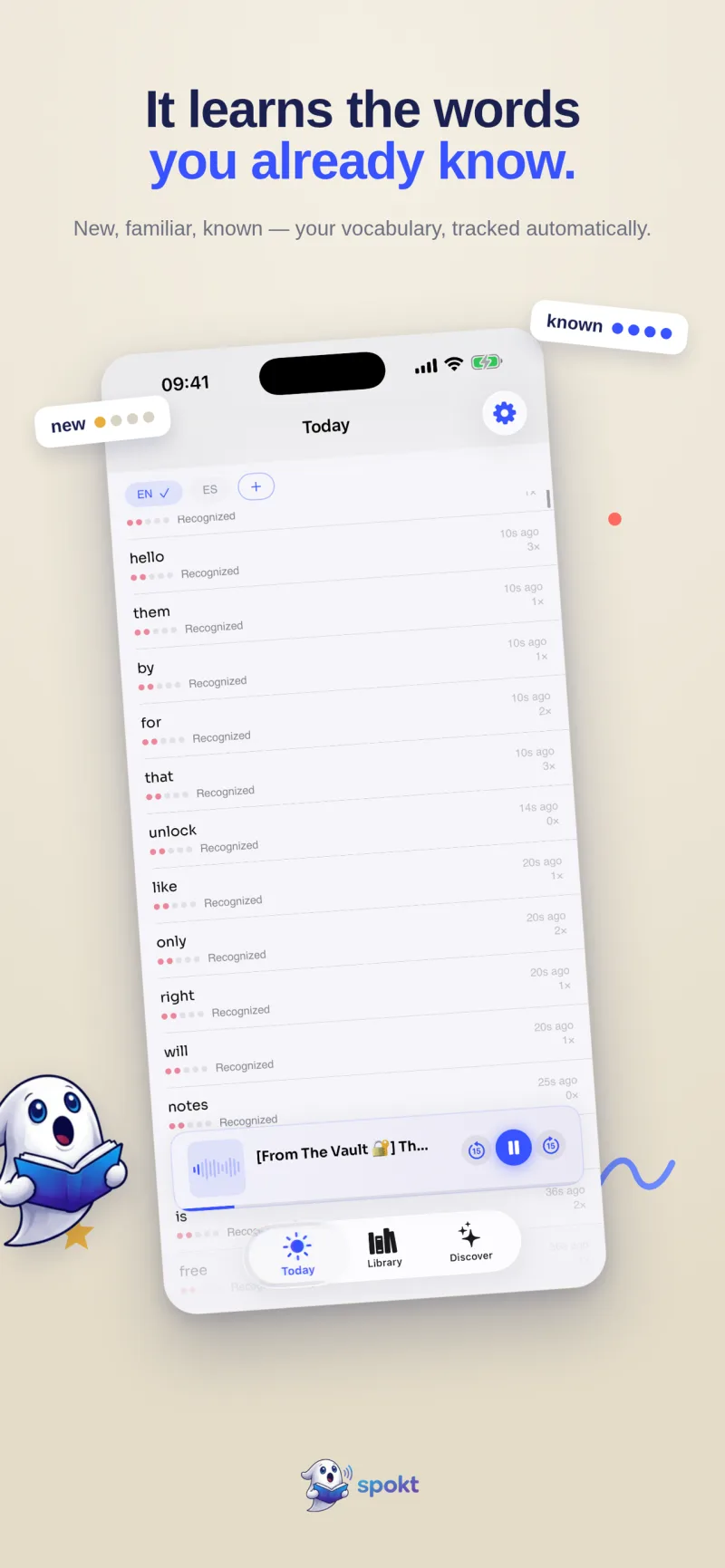
Spokt (that's us, so weigh accordingly) is the iOS-native option. You import PDFs, EPUBs, web articles, plain text, or your own MP3 and M4B audiobooks; the app reads text aloud with natural AI voices and highlights each word in sync; tapping any word gives an instant on-device translation (the app ships in 10 languages, including right-to-left Arabic). Vocabulary tracking is automatic — no statuses to manage — and pricing is a real free tier, an optional Plus plan, or a one-time lifetime unlock.
Which alternative fits the way you get your input
The honest answer to "what's the best LingQ alternative" depends on where your input comes from:
- You read articles and ebooks at a desk. Readlang is the cheapest way to keep the click-to-translate reading habit, and its free tier may be all you need. If you're weighing LingQ vs Readlang specifically: Readlang wins on price and clarity, LingQ wins on library size and audio.
- You're a beginner who needs scaffolding. Beelinguapp's parallel text is forgiving, and any app with genuinely leveled content beats diving into raw native text. Spokt's quick placement check and A1–C2 Discover feed of stories, podcasts, and news exist for exactly this.
- Your input is mostly Netflix and YouTube. Language Reactor, full stop — none of the reader apps competes there.
- You listen — podcasts, audiobooks, articles read aloud — and you live on your phone. This is where the field thins out fast, and where Spokt is strongest: everything in your library plays with word-synced highlighting, natively on iPhone and iPad, wherever you actually do your listening.
One more honest note on level: input-based tools shine from roughly A2 upward, once you know enough words to make real content comprehensible. If you're a true beginner in a distant language, start with graded content matched to your level — that's what placement checks and leveled feeds are for — rather than forcing your way through native material one dictionary lookup at a time.
The two gaps nobody else covers: your own audio, and pay-once pricing
Run down the table again and two gaps stand out. The first is audio you already own. Every app above either supplies its own audio (LingQ lessons, Beelinguapp stories) or supplies none (Readlang). None of them turns the audiobook and podcast files already sitting on your drive into a word-synced read-along. Spokt does: drop in MP3 or M4B files — a folder becomes a book, the files become its chapters — add the companion PDF or EPUB text, and you get a word-synced karaoke transcript of real human narration, with the same tap-to-translate and automatic vocabulary tracking as everything else in your library. If that's your main use case, our guide to learning a language with audiobooks walks through the whole workflow.
The second gap is the pricing model. LingQ, Readlang, and Beelinguapp are all subscriptions — some more reasonable than others, but subscriptions. If the $120-a-year treadmill is what sent you searching for an alternative in the first place, note that Spokt is free to download with a usable free tier (monthly sync minutes and premium voice time included), and offers a one-time lifetime unlock: pay once, keep it, no renewal emails. With a paid plan, top up premium voice time and sync minutes anytime with voice packs.
How Spokt replaces the LingQ loop on your iPhone
If the comparison points you our way, here's what switching actually looks like, step by step.
- Download Spokt and pick Learner modeSpokt is free on the App Store for iPhone and iPad. Choose Learner (or Both) and the app reshapes itself around language learning.
- Take the quick placement checkA short check estimates your level, so the Discover feed shows real stories, podcasts, and news leveled A1–C2 instead of drowning you in text that's too hard.
- Import your own content — or browse DiscoverBring in PDFs, EPUBs, web articles, plain text, even your own MP3/M4B audiobooks (folder = book, files = chapters). Your LingQ import habit survives the switch intact.
- Listen while you read, tap what you don't knowWord-by-word karaoke highlighting follows the audio. Tap any word for an instant on-device translation — the app ships in 10 languages, including RTL Arabic.
- Let vocabulary track itselfEvery word you read and hear moves new → familiar → known automatically. No color-coding, no manual statuses, no flashcard chores.
- Review only if you want toOptional FSRS spaced repetition builds reviews from words you actually met in context, and the dashboard counts your hours of comprehensible input.
Frequently asked questions
Is there a genuinely free LingQ alternative?
Readlang comes closest: its free tier includes unlimited reading and unlimited single-word translations on the web, with only phrase translations capped per day. Spokt is also free to download with a real free tier — monthly sync minutes and premium voice time are included — so the tap-translate and automatic word-tracking loop works without paying. LingQ's own free plan caps you at 20 saved words total, which makes it a trial rather than a tier. With a paid plan, top up premium voice time and sync minutes anytime with voice packs.
LingQ vs Readlang: which should I pick?
Pick Readlang if you read in a desktop browser and want the cheapest, cleanest version of click-to-translate reading — it's $6 a month with a generous free tier. Pick LingQ if you want a huge built-in lesson library with audio across around 50 languages and the price and busy interface don't bother you. Neither one gives you a native iPhone app with word-synced audio; if that combination matters, that's the gap Spokt was built to fill.
What's a good Beelinguapp alternative once I outgrow its catalog?
The natural next step is any reader that imports your own content instead of serving a fixed story library: LingQ, Readlang, and Spokt all let you bring in the articles and books you actually want to read. Spokt additionally imports your own MP3, M4B, M4A, and WAV audiobooks with a word-synced transcript, so you keep Beelinguapp's read-along-with-narration feel on real, self-chosen material — see our guide to learning a language with audiobooks.
Do any LingQ alternatives track known words automatically?
Most don't — LingQ and Readlang both rely on you to mark word statuses or manage a flashcard queue by hand, which is exactly the chore that burns people out. Spokt tracks vocabulary passively: every word you read and hear moves from new to familiar to known on its own, and the optional FSRS review is built from words you actually encountered in their original context. We cover how that works in our guide to apps that track the words you know.