 spokt
spoktLearner guide
Yes, There's an App That Translates Words While Reading
Yes — there's more than one app that translates words while reading: tap the word, see the meaning instantly, keep going, no app-switching. The catch is that this search surfaces three unrelated tool types — camera translators, ebook-only readers, and true in-page tap-to-translate apps — and only the last one is what you want. Here's how Kindle, Smart Book, Apple's built-in translation, and Spokt compare, including the one thing the others lack: narration synced to the words you're tapping.
Three tools hide behind this search — only one is a reading app
Search for a tap to translate reading app and you'll get three very different tools mixed together. First, camera and scan translator utilities — Scan & Translate, iTranslate, Google Lens — which translate a photo or screenshot of text. They're great for menus and street signs, but they have no concept of a book: no reading position, no flow, no record of what you looked up. If you're trying to read, they're the wrong tool wearing the right keywords.
Second, what iOS already does. In most apps you can select a word, then tap Translate in the pop-up menu — Apple's guide to translating text in apps walks through it — and the Translate app can download language packs so translation runs on-device. It's genuinely useful for the occasional lookup, and it's free. But the friction is real: select the word, wait for the menu, tap More if Translate isn't showing, read the sheet, dismiss it, find your place again. Do that thirty times in a chapter and you'll stop reading. And nothing is saved anywhere — every lookup evaporates the moment you dismiss it.
Third — the thing you're actually searching for — reading apps with translation built into the page: your own text, one tap on any word, an instant gloss, no context switch. That category is small, and the apps in it differ on exactly the things that matter: whether translation runs on-device or on a server, whether you can bring your own content, and whether the app does anything useful with the words you tap.
Apps that translate words while you read, compared
Kindle is the quiet incumbent. Long-press a word and a dictionary definition appears; dictionaries download to the device, so definitions keep working offline. Full translation is a separate step — a Translation option in the lookup card — and that one requires a network connection. Words you look up land in Vocabulary Builder as flashcards, which is a real learning loop. The limits: it only works inside Kindle books and documents you send to it, and your reading is silent — there's no narration synced to the text you're tapping.
Smart Book is a dedicated bilingual reader: import EPUB, FB2, or TXT files and tap any word or passage for a translation drawn from engines like Google Translate and DeepL. It advertises around 100 languages — but every one of them is a server lookup, so each tap is a network round trip. Linga and GlowWords are built around ebooks: Linga pairs a large built-in library with your own EPUB and PDF imports, and GlowWords turns taps on any EPUB into one-tap flashcards — but neither pairs the text with narration synced to the words.
Spokt is the one built around audio. Import a PDF or EPUB, a web link, or plain text; a natural AI voice reads it aloud with word-by-word karaoke highlighting; and any word you tap translates instantly, on-device, in 10 languages including right-to-left Arabic. Every tap — and everything you read and hear — feeds an automatic vocabulary tracker.
| App | Translation | Your own content | Audio while reading | Learning loop |
|---|---|---|---|---|
| Spokt (iOS) | One tap, on-device, 10 languages incl. Arabic | PDFs, EPUBs, web articles, plain text; MP3/M4B audiobooks with companion text | Word-synced AI narration | Automatic new → familiar → known, optional FSRS review |
| Kindle | Offline dictionary; translation via menu needs a connection | Kindle books and sent documents | None synced to text | Vocabulary Builder flashcards |
| Smart Book | Tap, server engines (Google, DeepL), ~100 languages | EPUB, FB2, TXT | No word-synced narration | No automatic tracking |
| Linga / GlowWords | One-tap translation via online engines | Built-in library plus EPUB and other imports | No word-synced narration | One-tap flashcards; SRS review (Linga) |
| iOS select-text Translate | Select → menu → sheet; on-device with downloaded packs | Any app's text | None | None |
On-device or server: the detail that decides whether you keep tapping
The single most useful question to ask any of these apps is where the translation happens. Server-based translation is how an app gets to advertise 90 or 100+ languages: it sends your word to Google Translate or DeepL and waits for the answer. That works, but the costs land exactly where reading lives. Every lookup has latency, every lookup needs a connection, and a spotty train ride turns your reader into a loading spinner.
On-device translation flips the trade. Lookups are effectively instant, they don't care whether you have signal, and the words you're reading never leave your phone. The cost is honesty about language counts: an on-device app supports the languages whose models actually run well on the device. Spokt supports 9 — English, Arabic, Spanish, French, German, Italian, Japanese, Korean, Portuguese, and Turkish, with full right-to-left rendering for Arabic — and that's a deliberate quality-over-quantity trade. A 100-language checkbox doesn't help you if each tap costs a couple of seconds, because at that price you start rationing your taps — and rationing taps defeats the entire point of reading with a translation layer under your finger.
Kindle sits in the middle: its dictionary works offline once downloaded, but the Translation option needs a wireless connection. Apple's Translate can also run fully on-device once you download language packs — the friction there is the gesture, not the engine.
A good lookup feeds two things: your ear and your word count
Here's what none of the other tap-translate readers offers: sound. Reading and listening at the same time — the text in front of you, a voice reading it, each word highlighting as it's spoken — is how you attach pronunciation to spelling and train your ear on the same sentences your eyes are parsing. It's the same reason reading along with audiobooks beats passive listening. In Spokt the lookup lives inside the same player: drop playback to 0.75× while a text is still hard, or loop a single sentence in the immersive teleprompter until it clicks.
The second thing a lookup should feed is your vocabulary record. Kindle's Vocabulary Builder and GlowWords' one-tap flashcards both get the idea: the words you tap are precisely the words you should meet again. Spokt's version goes further in two directions. Tracking is automatic and covers everything — every word you read or hear moves from new to familiar to known on its own, so the app knows your vocabulary without you marking a single word (here's how the automatic word tracking works). And review is optional and grounded: if you turn on spaced repetition, the FSRS deck is built only from words you actually encountered, shown in their original sentence context — not from a frequency list someone else compiled.
Put together, that's the loop the comprehensible input method asks for: real content you chose, audio and text together, instant help on the words you don't know yet, and a record that grows while you read. Whether you want to read in Spanish with translation on tap — or Arabic, French, Japanese — the reader, the translator, and the tracker work best as one app.
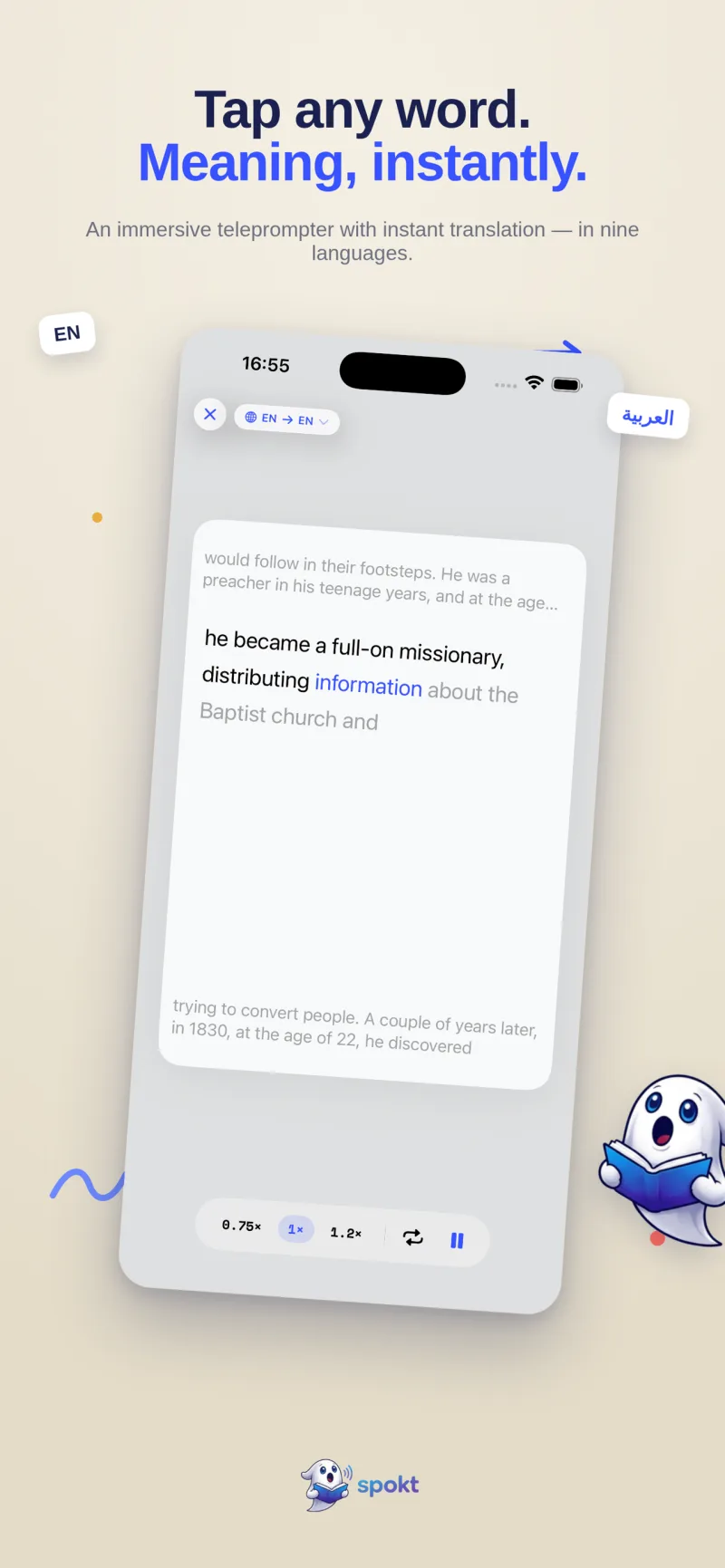
How tap-to-translate works in Spokt
Spokt is free on the App Store for iPhone and iPad. Here's the whole flow from a cold install to your first translated word.
- Install and pick your modeDownload Spokt free from the App Store and choose Learner — or Both, if you also want it as an everyday read-aloud app.
- Bring in something you want to readImport a PDF or EPUB, paste a web link, or drop in plain text — or open the Discover feed and pick a story, podcast, or news piece leveled A1–C2. A quick placement check finds your level.
- Press playA natural AI voice reads aloud while each word highlights karaoke-style. Slow playback to 0.75× while a text is still hard, or loop a sentence in immersive mode.
- Tap any word you don't knowThe translation appears instantly — on-device, in 10 languages including RTL Arabic — without leaving the page. No app switch, no losing your place.
- Let the tracker do the bookkeepingEvery word you read, hear, or tap moves from new to familiar to known automatically, and your dashboard logs your hours of comprehensible input.
- Review only if you want toOptional FSRS spaced repetition builds a deck from words you actually met, shown in their original sentences — no manual card-making.
Frequently asked questions
Is there a tap to translate reading app that works without a connection?
Spokt's translations run on-device, so the lookup itself never touches a server — tap a word and the meaning appears whether or not you have signal. Kindle is split: its dictionary works offline once downloaded, but its full Translation option requires a network connection. Smart Book and GlowWords rely on server engines like Google Translate, DeepL, and OpenAI, so every tap there needs a connection.
What's the best reading app with tap to translate for Spanish?
For reading in Spanish with translation on tap, look for three things: content at your level, instant lookups, and audio so you hear the Spanish you're reading. Spokt covers all three — a Discover feed of Spanish stories, podcasts, and news leveled A1–C2, on-device tap-translate, and word-synced narration — which is exactly the combination the comprehensible input approach is built on.
How is this different from Scan & Translate or iTranslate?
Those are camera and utility translators: you photograph or paste text and get a one-off translation, which is perfect for menus, signs, and forms. A reading app with tap to translate is a different tool — the translation layer lives inside the page you're reading, so you tap a single word mid-sentence, see the gloss instantly, and keep your place, your audio, and a record of what you looked up.
Do I have to make flashcards from the words I tap?
No. Spokt tracks vocabulary automatically — every word you read, hear, or tap moves from new to familiar to known without any manual marking, as explained in this guide to automatic word tracking. If you want active review on top, optional FSRS spaced repetition builds a deck only from words you actually encountered, in their original sentence context.
How much does Spokt cost?
Spokt is free to download with a real free tier that includes monthly sync minutes and premium voice time, so you can try tap-to-translate on your own content before paying anything. If you need more, there's an optional Plus subscription — or a one-time lifetime unlock, with no subscription required. Details are on the Spokt homepage. With a paid plan, top up premium voice time and sync minutes anytime with voice packs.