 spokt
spoktReader guide
Audiobook Apps With Synced Text: Read Along With Books You Own
An audiobook app with synced text highlights the words on screen while the narration plays, so you can read and listen at the same time. Amazon sells this as Whispersync and Immersion Reading — but only for titles you buy twice, in both formats, from Amazon. If your audiobooks are DRM-free MP3 or M4B files, a small set of tools — Storyteller, syncabook, Voxlight, and Spokt — can sync the text for you, and this guide compares all of them.
How Whispersync and Immersion Reading actually work
The mainstream version of read-along audiobooks belongs to Amazon, under two brand names. Whispersync for Voice keeps your place in sync between a Kindle ebook and its Audible audiobook: pause the narration in the car, and the Kindle app opens on the same paragraph at home. Immersion Reading goes one step further — the Kindle app highlights the text in real time while the professional narration plays, so you read and listen at once.
The catch: you must own both formats, and both must come from Amazon. You buy the Kindle ebook first, then add the Audible narration — typically $1.99 to $7.49 per title for Whispersync for Voice-enabled books, depending on the publisher. And it only works where matching editions exist and are linked in Amazon's catalog. The selection is large, but it is a subset — niche, indie, and older titles often miss out.
The bigger limit is DRM. The pairing lives entirely inside Amazon's apps: you can't export a synced book, you can't import your Audible purchases into a third-party reader, and you can't attach Whispersync to an MP3 you bought somewhere else. If your audiobooks are DRM-free files — ripped from CDs, bought directly from an indie author or a DRM-free store, or downloaded free from LibriVox — Amazon's tools can't touch them. That's exactly why so many people go looking for a Whispersync alternative for their own books.
Audiobook apps with synced text for files you already own
To pair your own audio with its text, an app has to do forced alignment: listen to the narration, match it against the book's text, and produce a timestamp for every sentence or word. A few years ago that required research software. Today four consumer-grade tools do it, each with a very different setup cost.
| Tool | Runs on | Sync precision | Text formats | Extra requirements | Price |
|---|---|---|---|---|---|
| Storyteller | Self-hosted server + mobile apps | Sentence highlighting | EPUB | Your own server; alignment is CPU-heavy | Free, open source |
| syncabook | Command line | Sentence-level (EPUB3 media overlays) | Text files → EPUB3 | Comfort with a terminal | Free, open source |
| Voxlight | iPhone / iPad | Chapter-level on iOS; word-level via Mac companion app | EPUB only (PDF planned) | A Mac for word-level sync | Free up to 5 books; $19.99/yr launch price (regular $29.99) or $49.99 lifetime |
| Spokt | iPhone / iPad | Word-level, on the phone | PDF or EPUB companion | None | Free tier; optional Plus or one-time lifetime unlock |
Storyteller is the open-source favorite. You run its server at home (or on a hosted pod), feed it a matching EPUB and audiobook, and it bakes the audio into an aligned ebook that its reader apps play with sentence highlighting. It works well — but transcribing and aligning a full-length audiobook is genuinely resource-intensive, and you're signing up to administer a server. syncabook takes the same idea to the command line and outputs standard EPUB3 ebooks with synchronized narration; it's free and flexible, but it's a developer tool, not an app.
Voxlight is the closest thing to a polished consumer product in this space: an iOS audiobook reader that syncs your MP3 or M4B files with an EPUB, with a free tier covering five synced books. Two things to know before committing: on the iPhone alone you get chapter-level sync — word-level precision requires its Mac companion app, which runs the alignment on your computer and exports the result to iOS — and it reads EPUBs only for now, with PDF support still on the roadmap.
Spokt is the fourth option, and the one this site is about, so here's the honest one-line version: of the four, it's the one that does word-level sync right on the iPhone with no extra hardware, the one that accepts a PDF as the companion text — and the one your Files app can share into directly, no export step. The full walkthrough is below.
The text-to-speech route: highlighting without an audiobook
There's a second way to get read-along highlighting, and it skips the audiobook entirely. Text-to-speech apps — Speechify, the old Voice Dream Reader, and Spokt's reader side — generate the narration from the text using AI voices. Because the app produces the audio itself, it knows exactly which word it's speaking, so word-by-word highlighting comes built in with nothing to align and nothing extra to buy.
The trade-off is the voice. Modern premium AI voices are natural enough for hours of listening, but they aren't a performance — no character voices, no pacing choices, no full-cast production. A sensible split: for fiction where the narrator is half the experience, sync the real audiobook. For nonfiction, textbooks, papers, and articles — where you mostly want the words in your ears at your own speed — TTS is often the better tool, and it works on anything you can open as text.
If that route fits you better, we've compared the options in detail: see our guide to apps that highlight words as they read aloud and our honest roundup of free Speechify alternatives.
Which setup fits you
The right sync-audiobook-with-ebook app depends less on feature lists than on the hardware and formats you already have:
- You buy everything on Amazon and don't mind paying for both formats → Whispersync and Immersion Reading are the most polished, zero-setup option.
- You run a home server and keep an EPUB library → Storyteller is free, private, and yours forever, at the cost of setup and CPU time.
- You have a Mac and an iPhone, read EPUBs, and don't mind a desktop processing step → Voxlight is a solid pick with a fair five-book free trial.
- You're iPhone-only with MP3/M4B files and a PDF or EPUB of the text, and you want word-level highlighting with no extra hardware → that's the gap Spokt was built for.
- You own the text but not the audio → skip syncing and use a text-to-speech app instead.
One more audience worth naming: language learners. Reading along while a native narrator speaks — the listening-reading method — is one of the most effective uses of synced text there is, and we cover it separately in how to learn a language with audiobooks.
How to read along with your own audiobooks in Spokt
Spokt takes the setup out of the picture: word-level sync happens right on your iPhone, with no server to run, no Mac companion to install, and no second purchase of a book you already own. Import the audio, attach the text, press play.
- Get Spokt on your iPhone or iPadDownload it free from the App Store. The free tier includes monthly sync minutes, so you can align your first audiobook without paying anything. With a paid plan, top up premium voice time and sync minutes anytime with voice packs.
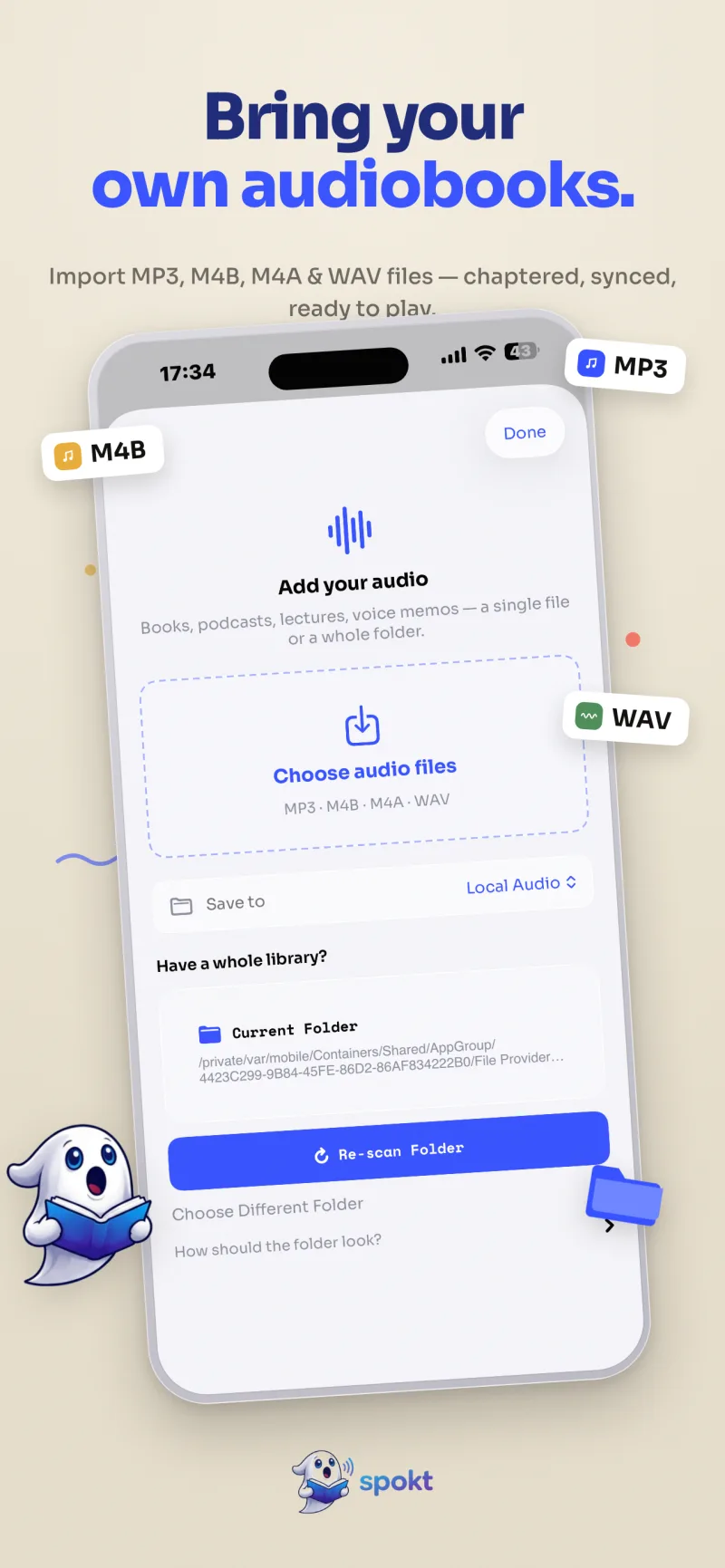
- Import your audiobook filesShare the audio straight from the Files app — select the files (several at once works, PDF alongside included) and open them in Spokt; it launches right into the import. Or tap Add Audio in the library to pick files or scan a folder. MP3, M4B, M4A, WAV: multiple files become one book with chapters or separate books, your choice, and M4B chapter markers are extracted automatically.
- Attach the companion textAdd the book's PDF or EPUB so Spokt has the original text — include it in the share, or attach documents later from the book's own page. You can open View Original PDF from the player any time you want the real page layout.
- Press play and read alongThe narration plays with word-by-word karaoke highlighting perfectly synced to the audio — the same highlighting Spokt uses across everything in your library.
- Set your paceAdjust playback speed from 0.75× up to 2×, and use sentence loop in the immersive teleprompter mode when you want to hear a line again.
- Shape the book your wayRename a book, reorder its chapters, add parts as you get them, combine several audios into one chaptered book, or split them back apart — all from the book's own page. Nothing about an import is locked in.
- Pick up anywhereYour library keeps books in folders, shows progress on each cover, and syncs your position across your devices — heavy importers can move to Plus or the one-time lifetime unlock.
Frequently asked questions
Can you get immersion reading without a Kindle?
Yes. Immersion Reading is just Amazon's brand name for synced text and narration, and the concept isn't locked to a Kindle. Storyteller (self-hosted), Voxlight (iOS plus a Mac for word-level sync), and Spokt (iOS, word-level on the phone) all recreate it — the difference is that they work with DRM-free audiobook files you already own instead of requiring you to buy both formats from Amazon.
Can I sync my Audible or Kindle purchases in a third-party app?
No. Audible audiobooks and Kindle ebooks are DRM-protected, so the synced pairing only works inside Amazon's own apps and can't be exported or imported elsewhere. Third-party sync tools need DRM-free files — MP3 or M4B audio plus an EPUB or PDF of the text — from sources like indie authors, DRM-free stores, or public-domain libraries such as LibriVox.
What's the best app to sync an audiobook with an ebook on iPhone?
It depends on your setup. If you keep an EPUB library and own a Mac, Voxlight works well; if you run a home server, Storyteller is free and open source; if you want word-level highlighting entirely on the iPhone — and your text might be a PDF rather than an EPUB — Spokt is the only one of the four that covers that combination, with a free tier to test it on your own book.
Does Spokt read EPUBs aloud with AI voices?
Yes. Spokt converts EPUBs — along with PDFs, web articles, and plain text — into audio with natural premium voices and word-by-word highlighting, and you can pick exactly which chapters to convert. An EPUB (like a PDF) can also serve as the companion text for an audiobook you import, so your own MP3/M4B narration gets word-synced to it.
What audio formats can I import into Spokt?
MP3, M4B, M4A, WAV, and AAC. Share the files straight from the Files app and Spokt opens with them, pick them from the import sheet, or scan a folder — multiple files become one chaptered book or separate books, your choice, and M4B chapter markers are extracted automatically. The free tier includes monthly sync minutes for aligning your audio with its text; if you import a lot, there's an optional Plus subscription or a lifetime unlock you pay for once. With a paid plan, top up premium voice time and sync minutes anytime with voice packs.