 spokt
spoktLearner guide
An App That Tracks Words You Know — No Flashcards Needed
Yes — an app that tracks words you know without hand-marking exists: Spokt for iPhone and iPad watches what you actually read and listen to, and moves every word from new to familiar to known on its own. No flashcards to make, no statuses to click, no word lists to maintain. First, though, it's worth seeing how manual trackers like LingQ and Anki handle this today, how many words each CEFR level really takes, and why continuous tracking beats any one-off vocabulary test.
How LingQ, Readlang, and Anki track known words (by hand)
Most vocabulary tracking today depends on you doing the clerical work. LingQ, the best-known reading-based tracker, colors every word in a lesson: new words are blue, words you've saved to study turn yellow, and known words go plain. You tap each word through a one-to-four familiarity scale — one word at a time, for every word you ever meet. The system works, and LingQ's known-word counts are a big reason input-based learners swear by it. But you are the sensor, and the sensor gets tired.
The data leaks, too. Turning the page or finishing a lesson marks every remaining blue word as known — whether you knew it or not — a behavior users have complained about on LingQ's forums for years. Skim one article carelessly and your count absorbs dozens of words you never learned. There's a cost gate as well: LingQ's free plan caps you at 20 saved words total, so meaningful tracking effectively requires Premium at $14.99 a month or about $120 a year.
Readlang works on the same principle with lighter bookkeeping — words you click for a translation drop into a flashcard queue you curate yourself. Anki, the power-user option, doesn't track your vocabulary at all: it only knows about words you noticed, looked up, and manually turned into cards. Everything you understood without stopping is invisible to it.
Notice the shared assumption: the app can't tell what you know, so it asks you to keep telling it. That's the part that burns people out — and the part that's now solvable. (If LingQ specifically is what brought you here, our LingQ alternatives guide compares the whole field.)
How many words you need to know at each CEFR level
Behind the search for a vocabulary tracker app is usually a more basic question: how big is my vocabulary, and how big does it need to be? Researchers disagree on exact figures — vocabulary studies by James Milton and colleagues put the CEFR thresholds lower, while Paul Nation's word-family counts run higher — but the estimates cluster into usable ranges:
| CEFR level | Approximate vocabulary | What it typically feels like |
|---|---|---|
| A1 | 500–1,000 words | Survival phrases and simple, rehearsed exchanges |
| A2 | 1,000–2,500 words | Everyday routines; short, simple texts |
| B1 | 2,750–3,250 words | The gist of familiar topics; graded readers feel easy |
| B2 | 3,250–4,500 words | Native content with some effort; most conversations |
| C1 | 4,500–8,000 word families | Novels, news, and podcasts with occasional lookups |
| C2 | 8,000+ word families | Near-native range, including rare and idiomatic words |
Two caveats keep these numbers honest. First, "word" is slippery: some researchers count word families (run, runs, running, runner = one word) and others count individual forms, which can double or halve a figure. Second, these are receptive numbers — words you understand when you meet them — not words you can produce on demand.
The practical takeaway matters more than any single figure: reading research consistently finds you need to understand roughly 98% of the words on a page for comfortable reading. Knowing your real word count is how you pick content that sits just above your level instead of drowning in lookups — the sweet spot that input-based learning depends on.
Why one-off vocabulary tests and self-marked lists mislead
If you just want a number, online vocabulary size tests will hand you one in five minutes. Treat it as a rough sketch. These tests sample a hundred or so words across frequency bands and extrapolate to your whole vocabulary, and most use a yes/no format — "do you know this word?" — that quietly rewards overconfidence. Answer generously and the estimate can overshoot by thousands of words.
Self-marked lists fail in the opposite direction, and less predictably. Word knowledge isn't a checkbox; it's a gradient that runs from "recognize it in a helpful context" through "understand it instantly anywhere" to "produce it in speech." A binary known/unknown tap flattens that gradient into whatever you happened to feel on a given day — and manual systems then bake mistakes into your stats, like the page-turn behavior above.
Continuous tracking fixes both distortions because it's built on evidence instead of self-report. A word you've understood across ten encounters in three different articles is a fact about your memory. A checkbox you ticked in January is a guess. Tracking that updates itself every time you read or listen also answers the question a one-off test never can: not just how many words you know, but which ones — so an app can tell you which story, article, or podcast you're actually ready for.
Spaced repetition from reading, not from card-making
A word tracker earns its keep when it feeds review. The traditional route is Anki sentence mining: stop reading, copy the sentence, make a card, resume — thirty seconds to a minute per word, hundreds of times over. Ask former Anki users why they quit and it's rarely because spaced repetition failed; it's because card creation became a second job, and the review queue kept growing while the actual reading stopped.
The scheduling side of the problem is largely solved. FSRS, the modern spaced-repetition algorithm now built into Anki, models your personal forgetting curve from your review history; large-scale benchmarks on hundreds of millions of reviews suggest it needs roughly 20–30% fewer reviews than the classic SM-2 algorithm for the same retention. Fewer, better-timed reviews is exactly what a busy learner wants.
The unsolved half is what goes into the deck — and that's where reading-first tracking changes the economics. If an app already knows every word you've encountered, which ones you tapped for a translation, and the exact sentence each appeared in, your review deck can build itself: words you actually met, shown in their original context, scheduled by FSRS, with zero card-making. That's spaced repetition from reading in the literal sense — the reading generates the deck. It's the loop Spokt's optional review automates, built entirely from words you actually encountered.
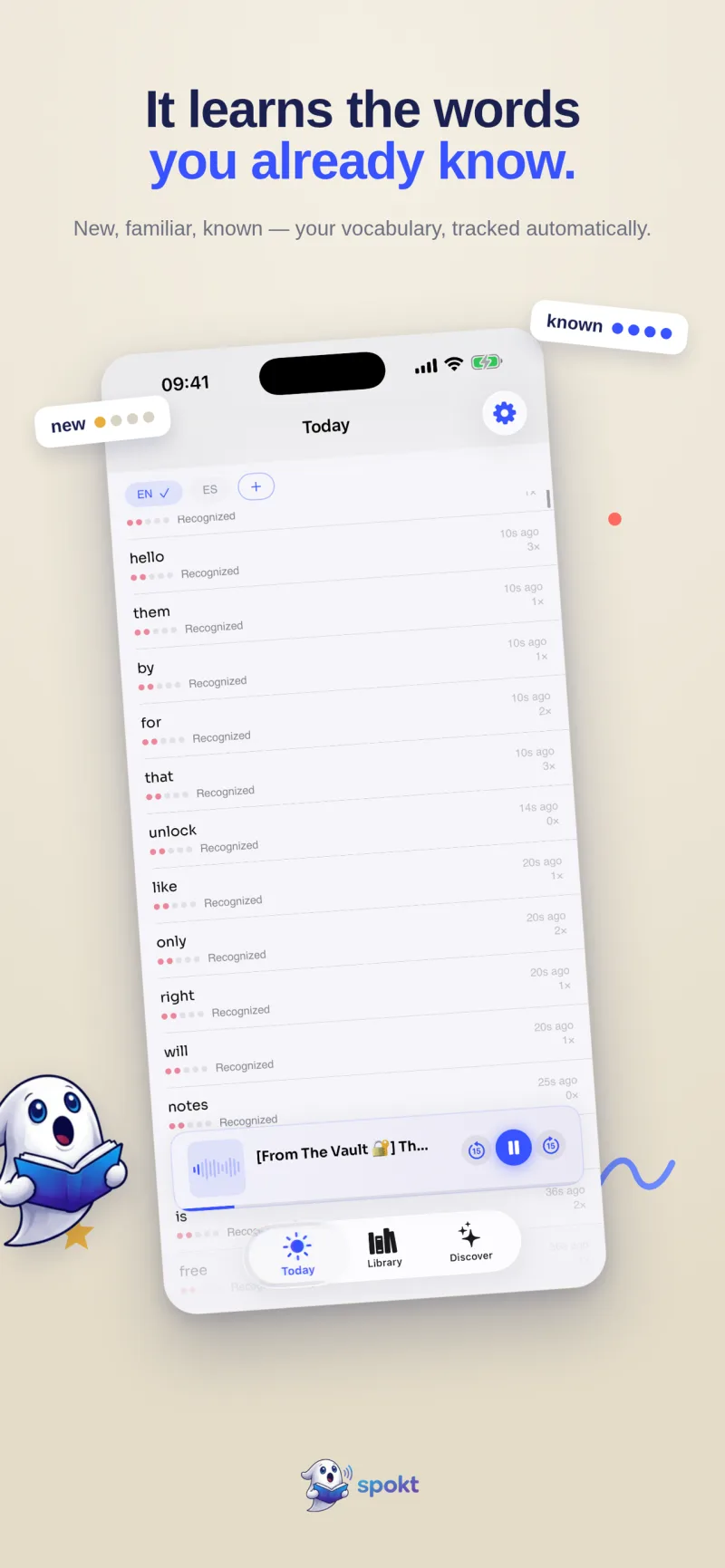
How Spokt tracks the words you know — automatically
Spokt is an iPhone and iPad app that flips the model: instead of you telling the app what you know, it watches what you actually read and listen to and keeps the score for you.
- Download Spokt and pick Learner modeSpokt is free on the App Store. Choose Learner (or Both) during setup and the app reshapes itself around language learning.
- Take the quick placement checkA short check estimates your level, so the Discover feed of real stories, podcasts, and news is leveled to you from A1 to C2.
- Read and listen to anythingOpen Discover content, or import your own PDFs, EPUBs, web articles, and MP3/M4B audiobooks — everything plays with word-by-word highlighting synced to the audio.
- Tap words you don't knowAny word gives an instant on-device translation in ten languages, including right-to-left Arabic — so lookups never pull you out of the story.
- Let the tracker do the bookkeepingEvery word you read or hear moves from new to familiar to known automatically — no marking, no flashcards, no accidental page-turn "known" words.
- Review only if you want toTurn on the optional FSRS review queue, built solely from words you actually encountered. Your dashboard also counts your hours of comprehensible input as they accumulate.
Frequently asked questions
Is there a free vocabulary tracker app for language learning?
Partly. Anki is free but only tracks words you manually turn into cards, and LingQ's free plan stops at 20 saved words, which makes real tracking impossible without Premium at $14.99 a month. Spokt is free to download with a genuine free tier, and if you outgrow it you can choose the Plus subscription or a one-time lifetime unlock — no forced subscription to keep access to your word data. Our LingQ alternatives comparison covers how the pricing models stack up.
How do I track how many words I know in a language?
You have three options: take a one-off vocabulary size test (fast but rough — it samples around a hundred words and extrapolates), hand-mark word statuses in a reader like LingQ (accurate only if you're disciplined about every tap), or use automatic tracking that counts words as you genuinely encounter and understand them. Continuous tracking built from real reading and listening gives the most honest number, because it rests on evidence rather than self-assessment — and it tells you which words you know, not just how many.
Does spaced repetition from reading work better than pre-made decks?
For most learners, yes. A word you met in a real sentence arrives with context — the story, the sentence, the moment — which makes it easier to anchor than a random frequency-list card. Spokt's optional FSRS review is built only from words you actually encountered, so you never grind through vocabulary you've never seen in the wild.
Does automatic tracking work on my own PDFs, articles, and audiobooks?
Yes. Spokt tracks vocabulary across everything in your library, not just a curated catalog: imported PDFs, EPUBs, web articles, plain text, stories and podcasts from the Discover feed, and MP3 or M4B audiobooks you bring yourself. Tap-to-translate runs on-device in ten languages — English, Arabic, Spanish, French, German, Italian, Japanese, Korean, Portuguese, and Turkish — and the tracker follows everything you read and hear. See how tap-to-translate works while you read.