 spokt
spoktLearner guide
The Comprehensible Input App: Learn a Language With Real Content
Yes — comprehensible input apps exist, and they are built around exactly what you're looking for: real stories, podcasts, and news you can mostly understand, instead of translation drills. This guide explains the method in plain language, honestly compares the tools that take it seriously — LingQ, Dreaming Spanish, Linguin, Language Player, Beelinguapp — and shows how Spokt turns leveled reading and listening into measurable progress on your iPhone.
What is comprehensible input, exactly?
Comprehensible input is any message in your target language that you can mostly understand — a story, a podcast, a news article — even if you don't know every word in it. The idea comes from linguist Stephen Krashen, whose input hypothesis argues that you acquire a language in essentially one way: by understanding messages that sit just beyond your current level. He called that sweet spot "i+1" — your current competence ("i") plus one small step of new language you can work out from context.
Krashen drew a sharp line between acquisition and learning. Learning is what drills and grammar exercises produce: conscious knowledge about the language that you retrieve slowly, one rule at a time, while trying to speak. Acquisition is what happens when you follow a story so interesting you forget you're studying — the grammar and vocabulary settle in as a byproduct of understanding. It's how you picked up your first language, and it's why people who read and listen a lot in a foreign language so often outpace people who diligently study it.
The practical upshot: your job as a learner isn't to memorize the language. It's to pile up hours of listening and reading you genuinely understand and enjoy — and a comprehensible input app exists to make that pile-up easy, measurable, and hard to quit.
Why drill apps plateau — and what input does differently
If you've kept a Duolingo streak for a year and still can't follow a podcast, nothing is wrong with you. Drill apps are built around isolated sentences, translation exercises, and streak mechanics — genuinely good at getting you to show up every day, much less good at supplying the volume of real, connected language your brain needs to build comprehension. You end up knowing about the language without being able to use it at speed, which is exactly the plateau so many learners describe.
Input-based learning flips the ratio. Instead of ten minutes of gamified sentences, you learn a language by listening and reading things you actually want to consume: graded stories at first, then podcasts, news, and eventually books. Vocabulary shows up dozens of times in real contexts instead of once on a flashcard, so it sticks. Grammar patterns get absorbed the way you absorbed your native language's — by meeting them constantly in meaningful sentences, not by filling in conjugation tables.
Reading and listening also reinforce each other. Extensive reading — a high volume of easy, self-chosen text read for pleasure — is one of the best-documented vocabulary builders in language research, and pairing the text with audio (reading while listening) adds listening speed and pronunciation on top. That combination — words on the page synced with a voice in your ears — is the engine a good comprehensible input app is built around.
Does it work for beginners — and how many hours do you need?
Comprehensible input works from day one, with one condition: the content has to actually be comprehensible to you. A complete beginner drowning in native-speed podcasts isn't getting input, just noise. Beginners need graded material — simple stories and slow, clear speech written for A1–A2 learners — while intermediates can move to easier native content with support like tap-to-translate. That's why leveling matters more than any other feature in this category: a quick placement to find your CEFR level (A1–C2), then a feed of content that sits at your "i+1" instead of far above it.
As for volume, the honest answer is: more than an app streak, less than forever. Dreaming Spanish, which popularized counting input in hours, maps milestones for an English speaker learning Spanish at roughly 50 hours (you recognize common words), 300 hours (you understand a patient speaker), 1,000 hours (everyday conversation feels comfortable), and 1,500 hours (comprehension close to a native's). Distant languages like Japanese, Korean, or Arabic take substantially longer. The exact numbers matter less than the unit: hours of understood input, not lessons completed. We break the milestones down level by level in how many hours of comprehensible input you need — but whatever your target, you'll want something counting those hours for you, because a visible total is what keeps a multi-year habit alive.
Comprehensible input apps compared: LingQ, Dreaming Spanish, Linguin, and more
Several apps take input seriously, and each does something well — it's worth knowing what before you choose.
Dreaming Spanish is the gold standard for video input in Spanish (and more recently French), with a deep leveled library and the hours-tracking framework much of the community uses. If Spanish is your language and video is your medium, it's excellent — but it covers just those two languages, video only, and doesn't touch your own reading. LingQ is the veteran reader: import almost any text, tap words, and mark them through manual known-word statuses. It's powerful and covers dozens of languages, but many learners find the interface cluttered and the Premium subscription (about $14.99/month) steep — we weigh the tradeoffs in our LingQ alternatives guide. Linguin offers tidy leveled stories and podcasts with per-word translations, focused on listening practice from a curated catalog. Language Player points a tap-to-look-up transcript at an enormous video catalog across 200+ languages. Beelinguapp shows parallel text — your language and the target language side by side — with audio, which some beginners love and input purists find crutch-like.
What almost none of them combine: curated content and your own content, automatic word tracking instead of manual marking, audio synced to the text at the word level, and an hours dashboard. That's the gap Spokt is built to fill on iPhone and iPad.
| App | Best for | Content | Word tracking |
|---|---|---|---|
| Dreaming Spanish | Spanish/French video learners | Curated leveled videos | — |
| LingQ | Importing your own text, many languages | Curated library + your own text | Manual statuses |
| Linguin | Leveled listening practice | Curated stories and podcasts | Tap-word translations |
| Language Player | Learning from video | Huge video catalog, 200+ languages | Manual word saves |
| Beelinguapp | Parallel-text beginners | Curated bilingual stories + audio | — |
| Spokt | Reading + listening with automatic tracking on iOS | Leveled Discover feed (stories, podcasts, news) + your own PDFs, EPUBs, articles, audiobooks | Automatic: new → familiar → known |
How to run the comprehensible input method in Spokt
Spokt is a comprehensible input app in the literal sense: every feature maps to a step of the method — leveled content in, instant help when you need it, and automatic proof that it's working. Here's the loop from zero.
- Download Spokt and switch on Learner modeSpokt is free on the App Store for iPhone and iPad. Choose Learner (or Both, if you also use it as a reader) and the app reshapes around language learning.
- Take the quick placement checkA short check places you on the CEFR scale (A1–C2) so the content you see actually sits at your level — the 'comprehensible' half of comprehensible input.
- Pick something real from the Discover feedBrowse stories, podcasts, and news leveled A1–C2 and choose whatever you'd genuinely enjoy — interest is what keeps the hours coming.
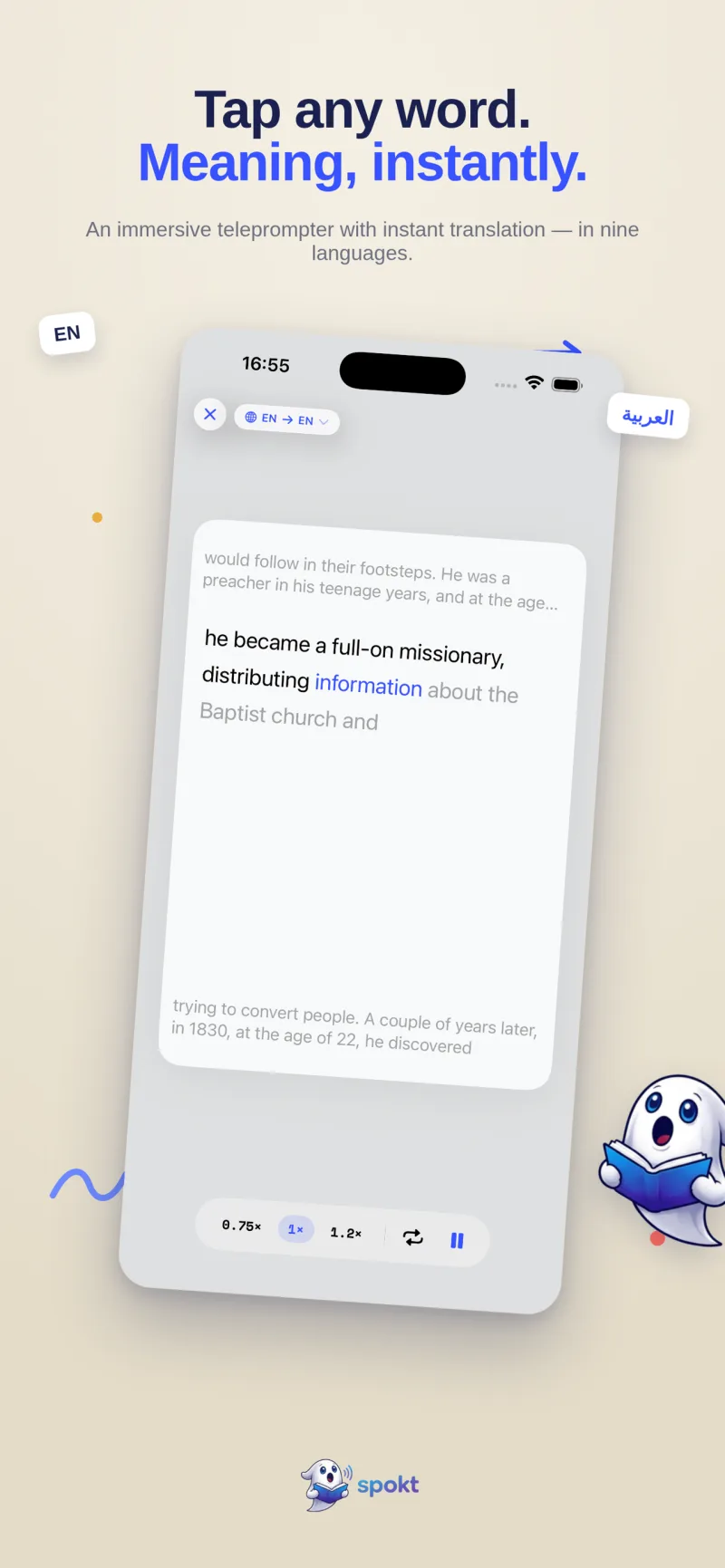
- Read along while you listenWord-by-word karaoke highlighting keeps your eyes locked to the audio. Slow playback to 0.75× while your ear catches up, or loop a sentence in immersive mode until it clicks.
- Tap any word you don't knowYou get an instant on-device translation without leaving the page — the app ships in 10 languages, Arabic included. Every word you read, hear, or tap moves through new → familiar → known automatically — no flashcards to make.
- Watch your input hours stack upThe dashboard counts your hours of comprehensible input as you go. If you want extra reinforcement, turn on optional FSRS review built only from words you actually encountered.
Frequently asked questions
Is comprehensible input enough on its own, or do I still need vocabulary review?
Input does the heavy lifting — most of your vocabulary will come from meeting words repeatedly in context — but a light review layer can speed up the long tail of words you meet too rarely. The trap is manual flashcard-making, which burns most people out before it pays off. A better setup is automatic tracking plus optional review: Spokt moves every word you encounter through new, familiar, and known on its own, and its optional FSRS review is built only from words you actually met in real sentences — see our guide to an app that tracks the words you know.
How many hours of comprehensible input do I need to learn a language?
For an English speaker learning a close language like Spanish, community estimates converge on roughly 1,000–1,500 hours of understood input for comfortable, near-native-feeling comprehension, with meaningful milestones starting around 50 hours; distant languages like Japanese, Korean, or Arabic can take two to four times longer. We map the milestones level by level in how many hours of comprehensible input you need.
Is Duolingo comprehensible input?
Mostly not. Duolingo's core exercises are translation drills on isolated sentences — useful for building a daily habit, but they don't supply the volume of connected, meaningful language that acquisition runs on. Its stories and podcasts come closer to genuine input and make a fine on-ramp; the plateau most long-streak users hit is the signal to shift the bulk of your time to real listening and reading at your level.
Can I use my own content — articles, PDFs, even audiobooks — as comprehensible input?
Yes, and it's one of the best upgrades you can make, because content you chose yourself is content you'll actually finish. In Spokt you can import PDFs, EPUBs, web articles, and plain text and have them read aloud with word-synced highlighting, or import your own MP3/M4B audiobooks with their companion text for a word-synced read-along — see how to learn a language with audiobooks.
What's the difference between comprehensible input and an extensive reading app?
Extensive reading is the reading half of the same idea: a large volume of easy, self-chosen text read for pleasure rather than study. Comprehensible input is the broader umbrella that includes listening too. In practice you want both at once — an extensive reading app that also plays word-synced audio gives you reading-while-listening, which builds vocabulary, listening speed, and pronunciation together instead of one at a time.