 spokt
spoktLearner guide
How to Practice Pronunciation and Dictation on Any Sentence
You can practice both on your own, with two exercises and one recording of a native speaker. Play a sentence and type what you hear, which tests your ear and your spelling in one go. Then read that same sentence aloud, record it, and play your version straight after the original. Neither exercise needs a teacher or a class. What they do need is sentences worth practicing, and that is where most tools give up: they hand you a fixed catalog and you work through someone else's material until it runs out.

The two exercises that do the work
Dictation is a comprehension test with nowhere to hide. Listening feels productive because your brain is allowed to guess; typing what you heard removes that permission. You have to resolve every word, including the unstressed articles, prepositions and contracted verbs that fluent listeners skate over without noticing. Plenty of learners discover their real gap is not vocabulary at all, but the small connective words that vanish at speed.
Reading aloud trains the other direction. Comprehension and production draw on different skills, and people who follow a podcast comfortably still stumble the moment they have to produce a sentence themselves. Saying a line you have just decoded hands your mouth the rhythm, the stress pattern and the sounds while the original is still fresh in your ear.
The pairing is what makes them worth doing together. Run the dictation first and read the line aloud second: by the time you speak it you already know exactly what is in the sentence, so your attention goes to how it sounds instead of what it says.
Why dictation and pronunciation apps run out of road
The category looks well served. Daily Dictation, Dictly and Open Dictation all do listen-and-type properly, with graded sentences and progress tracking. Speechace, TalkDrill and the browser pronunciation checkers handle the speaking half, scoring a recording word by word.
They share one limit: the sentences are theirs. You practice a catalog somebody assembled for a general learner, and when you finish it, or when it drifts from what you care about, the tool stops earning its place. None of it connects to the novel you are halfway through or the podcast you listen to on the walk to work, so practice ends up in a different app from the reading and listening that is doing the actual acquisition.
The more useful arrangement is practice attached to your own material: any sentence, in anything you are already reading or hearing, without leaving the page.
| Tool | Exercise | Sentences come from | Works on your own books and podcasts |
|---|---|---|---|
| Daily Dictation | Listen and type | Its own lesson catalog | No |
| Open Dictation | Listen and type, with spaced repetition | Its own catalog, seven languages | No |
| Dictly | Listen and type | Topic-based native recordings | No |
| Speechace, TalkDrill | Pronunciation scoring | Prompts you paste or pick | One sentence at a time, with no reading around it |
| Spokt | Both, on the same sentence | Whatever you are reading: your PDFs, EPUBs and audiobooks, or the leveled Discover feed | Yes |
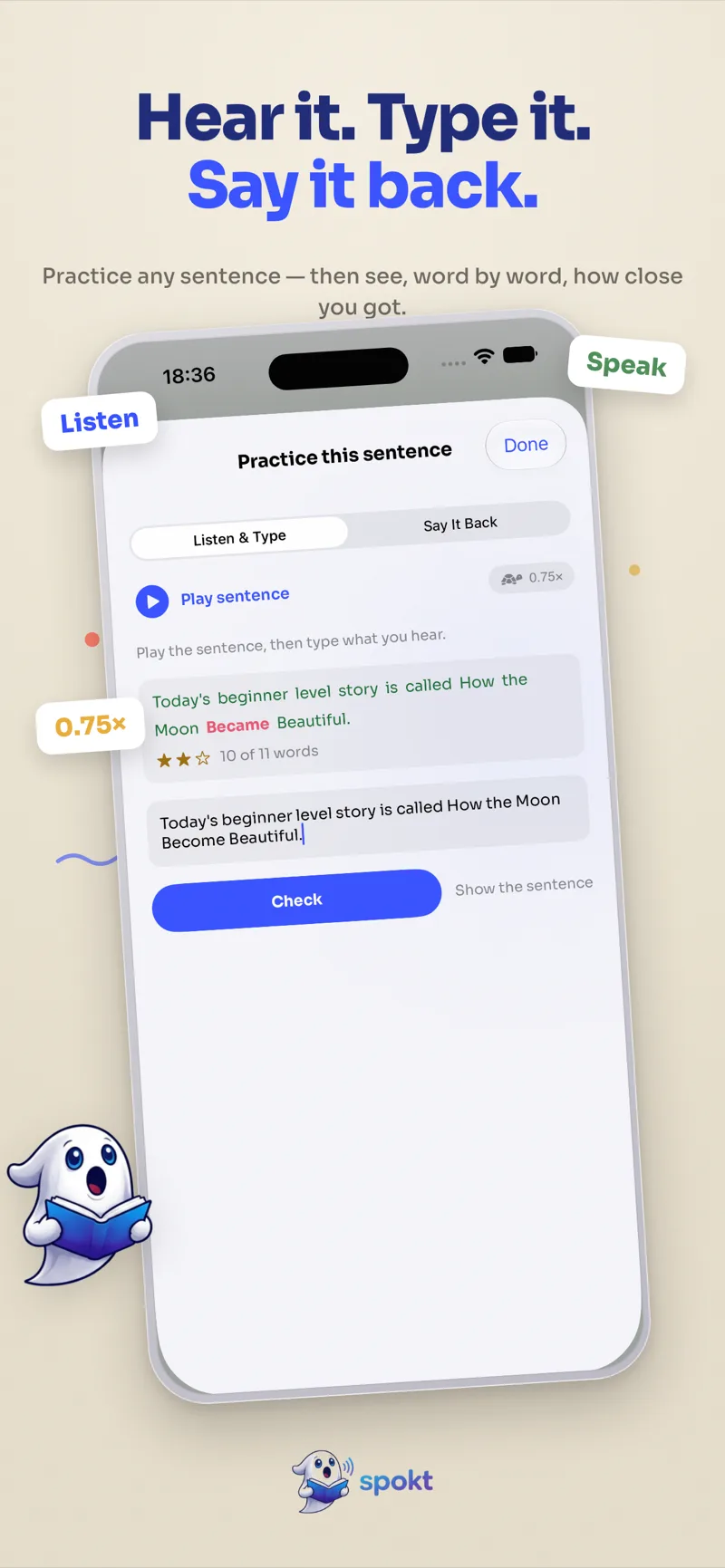
Listen and type: dictation on a sentence you chose
In Spokt the practice sheet is built from whichever line is in focus in the immersive reader, so the material is always something you picked yourself. On the Listen & Type tab the sentence is hidden. You play it, drop it to 0.75× if your ear needs the room, and type what you caught.
Checking marks your answer word by word: matches in green, misses in red, with a count of how many of the sentence's words you got. The comparison is more forgiving than a naive one, deliberately. Answers are normalized the same way the vocabulary tracker normalizes words, so case and stray punctuation are ignored, Spanish inverted marks do not count against you, and Arabic is matched without harakat. The alignment uses a longest common subsequence rather than checking position by position, which matters more than it sounds: drop one word early in a long sentence and a naive check fails everything after it, turning a small slip into zero.
Stars come from your first attempt only. Three means you had it cold, two means you cleared 75%, and retrying until the answer is perfect will not upgrade the rating. That is the point: it keeps "nailed it immediately" and "eventually got there" from collapsing into the same result.
Say it back: hearing yourself next to the native audio
The speaking half is built around an admission. Automatic accent scoring is the feature learners trust least, and the skepticism is earned: recognizers misfire on background noise, on regional accents, and on speech any human would understand perfectly well. A confident percentage laid over that is theatre.
So Say It Back leads with the part that holds up. It records you reading the line and keeps the recording, and you play your attempt directly after the native audio. Hearing the two back to back is a judgment your own ear makes well, and among learners of Rocket Record, Rosetta's TruAccent and similar tools it is consistently the half they report trusting. The sentence stays on screen in this tab, because reading aloud is the exercise here rather than recall.
Transcription runs on-device, so your voice is not uploaded anywhere. Recognised words are marked when iOS has a recognizer for the language you are reading in, and no star rating is attached, because that read-out is advisory rather than a grade. Where no recognizer exists, the record-and-compare loop still runs on the microphone permission alone, which leaves you with the more valuable half of the exercise rather than nothing at all.
How to practice a sentence in Spokt
Spokt is free on the App Store for iPhone and iPad, and practice sits inside the reader rather than in a separate drill section. The loop from a standing start:
- Open something you want to finishImport a PDF, EPUB, article, or your own MP3 or M4B audiobook, or pick a leveled podcast or story from the Discover feed. The sentence you practice should come from something you would read anyway.
- Switch to Immersive modePractice lives in the immersive teleprompter, where the text scrolls in time with the audio and one line stays in focus.
- Tap the practice button on the line in focusThe graduation-cap button opens a practice sheet built from that exact sentence, with Listen & Type and Say It Back as two tabs.
- Type what you hearOn Listen & Type the sentence is hidden. Play it, slow it to 0.75× if you need to, and type what you caught. Checking marks it word by word, correct words in green and misses in red.
- Read the same line aloud and record itSwitch to Say It Back. The sentence stays visible here, because this half is read-aloud practice rather than a memory test. Record yourself, then play your attempt straight after the native audio and listen for the gap.
- Move on and let the words countClose the sheet and keep reading. Every word you met still feeds the vocabulary tracker and your hours of input, so practicing a sentence is not time taken out of your listening.
Frequently asked questions
Does Spokt actually grade my pronunciation?
Not with a confident number, and that is deliberate. Spokt transcribes your recording on-device and marks the words it recognized, but in Say It Back that read-out is advisory and no star rating is shown. Automatic accent scoring is the part learners trust least, and it earns that skepticism, because recognizers misfire on background noise, regional accents and perfectly clear speech. What the app leans on instead is the recording itself: your attempt is kept so you can play it directly after the native audio and hear the gap yourself, which is a judgment your own ear makes better than a score does.
Can I practice in languages other than English?
Dictation works wherever the sentence does, because what you type is compared against the text rather than against a speech model. Spoken scoring depends on whether iOS ships a speech recognizer for the language of what you are reading; where it does not, the record-and-compare loop still runs on the microphone permission alone. In practice you get the full exercise in widely supported languages and the more valuable half of it everywhere else.
Will I be marked wrong for missing punctuation or Arabic diacritics?
No. Answers are normalized before they are compared, using the same rules the vocabulary tracker uses. Case is ignored, stray punctuation is dropped, Spanish inverted marks do not count against you, and Arabic is matched without harakat, since nobody types the short vowels in ordinary writing. The comparison also aligns your answer to the sentence with a longest common subsequence rather than a straight position-by-position check, so one wrong word in the middle does not cascade into failing every word after it.
Is dictation better than shadowing?
They train different things, and you want both. Dictation is a comprehension test with no hiding place: you have to resolve every word, including the unstressed articles and prepositions that fluent listeners skim past. Shadowing and reading aloud train production, rhythm and the muscle memory of the sounds. Doing the dictation first and reading the same sentence aloud second is a tidy pairing, because by the time you speak the line you already know exactly what is in it.